Understanding the WordPress Spam Comment Problem
Spam comments are a persistent challenge for WordPress site owners. In 2026, despite advances in anti-spam technology, comment spam continues to evolve, with spammers using increasingly sophisticated methods to bypass traditional filters. These unwanted comments can harm your site in several ways:
- Damage your site's reputation and credibility
- Waste your time with moderation tasks
- Slow down your website's performance
- Potentially spread malware through malicious links
- Negatively impact your SEO efforts
This comprehensive guide will walk you through effective strategies to combat spam comments on your WordPress site in 2026.
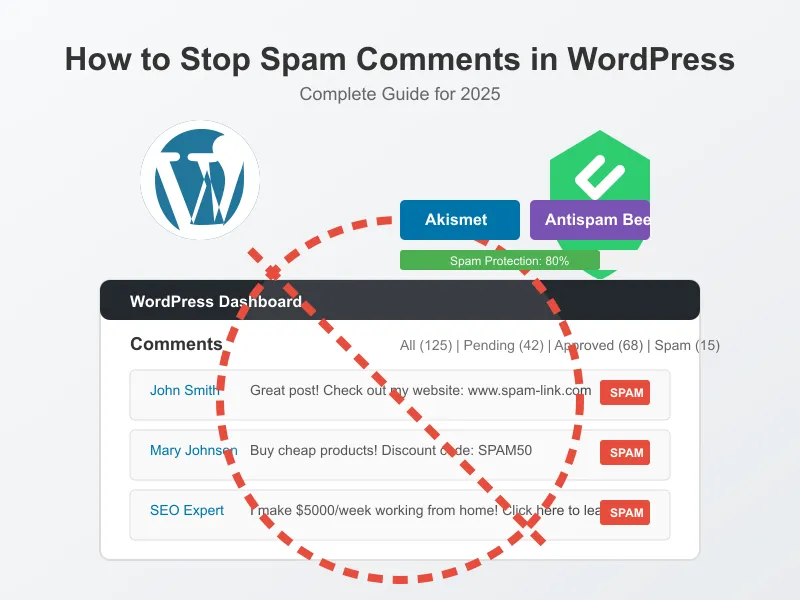
Typical spam comments in a WordPress dashboard
10 Effective Methods to Stop Spam Comments on WordPress
Let's explore the most effective approaches to combat comment spam on your WordPress site in 2026:
Method 1: Install a Dedicated Anti-Spam Plugin
The most effective way to combat spam comments is to use a dedicated anti-spam plugin. Here are the top options for 2026:
Akismet Anti-Spam
Akismet remains the gold standard for WordPress spam protection in 2026:
- How it works: Checks comments against the Akismet web service to determine if they're spam
- Setup: Requires an API key (free for personal blogs, paid for commercial sites)
- Effectiveness: Catches 99.9% of spam with minimal false positives
- Best for: All WordPress sites, especially those with moderate to high comment volume
Installation steps:
- Go to Plugins → Add New in your WordPress dashboard
- Search for "Akismet Anti-Spam"
- Click "Install Now" and then "Activate"
- Click on the "Akismet Settings" link
- Click "Get your API key" and follow the instructions
- Enter your API key and click "Save Changes"
Akismet plugin settings page
Antispam Bee
A powerful, free alternative to Akismet that doesn't require an API key:
- How it works: Uses multiple techniques including pattern recognition and IP checking
- Setup: No API key required
- Effectiveness: Very effective with proper configuration
- Best for: Privacy-conscious users and those who prefer not to use external services
Download Antispam Bee
CleanTalk Anti-Spam
A comprehensive solution that protects comments, registration forms, and contact forms:
- How it works: Cloud-based spam filtering with machine learning
- Setup: Requires a paid subscription (starts at $8/year)
- Effectiveness: Excellent at catching sophisticated spam
- Best for: Sites with multiple entry points for spam (comments, forms, registrations)
Download CleanTalk
Method 2: Enable Comment Moderation
WordPress has built-in moderation features that can help control spam:
- Go to Settings → Discussion in your WordPress dashboard
- Check "Comment must be manually approved"
- Alternatively, check "Comment author must have a previously approved comment"
- Configure "Comment Moderation" and "Comment Blacklist" settings with known spam terms
- Save Changes
Pro Tip: The second option (requiring a previously approved comment) is a good balance between security and user experience, as it only requires moderation for first-time commenters.
Method 3: Implement CAPTCHA or reCAPTCHA
CAPTCHA systems require users to prove they're human before submitting comments:
- Install a CAPTCHA plugin like "Google reCAPTCHA for WordPress"
- Register for a reCAPTCHA API key from Google
- Configure the plugin to protect your comment forms
In 2026, Google's reCAPTCHA v3 is particularly effective as it works invisibly in the background, scoring users based on their behavior without requiring them to solve puzzles.
Method 4: Use Comment Honeypots
Honeypots are invisible fields that trap automated spam bots:
- How it works: Adds a hidden field to your comment form that humans can't see but bots will fill out
- Effectiveness: Very effective against automated bots
- User experience: Excellent (invisible to legitimate users)
Plugins like "WP Armour" implement honeypot technology effectively.
Method 5: Disable Pingbacks and Trackbacks
Pingbacks and trackbacks can be sources of spam:
- Go to Settings → Discussion
- Uncheck "Allow link notifications from other blogs (pingbacks and trackbacks)"
- Save Changes
Disabling pingbacks and trackbacks in WordPress settings
Method 6: Close Comments on Older Posts
Older posts often attract more spam than legitimate comments:
- Go to Settings → Discussion
- Check "Automatically close comments on posts older than X days"
- Set an appropriate number (30-60 days is common)
- Save Changes
Method 7: Use Comment Blacklists
WordPress allows you to create a blacklist of terms, IPs, emails, and URLs:
- Go to Settings → Discussion
- Scroll to "Comment Blacklist"
- Add known spam terms, one per line
- Save Changes
In 2026, you can find updated spam term lists online that you can copy and paste into this field.
Method 8: Require User Registration
Limiting comments to registered users significantly reduces spam:
- Go to Settings → Discussion
- Check "Users must be registered and logged in to comment"
- Save Changes
This approach works well for membership sites but may reduce engagement on public blogs.
Method 9: Use a Web Application Firewall (WAF)
WAFs can block malicious traffic before it reaches your site:
- Options: Cloudflare, Sucuri, Wordfence
- Benefits: Blocks spam bots at the network level
- Setup: Requires DNS changes or plugin installation
WAFs provide comprehensive protection beyond just comment spam.
Method 10: Disable Comments Completely
If comments aren't essential to your site, consider disabling them:
- Go to Settings → Discussion
- Uncheck "Allow people to submit comments on new posts"
- Save Changes
For existing posts, you can use the "Disable Comments" plugin to bulk disable comments across your site.
Advanced Anti-Spam Techniques for 2026
As spam techniques evolve, these advanced methods provide additional protection:
Technique 1: AI-Powered Comment Filtering
In 2026, AI-based comment filtering has become highly effective:
- Plugins like "Akismet" and "CleanTalk" now use advanced AI to detect sophisticated spam
- These systems learn from patterns across millions of websites
- They can identify spam that mimics human behavior
Technique 2: IP Geolocation Filtering
If you receive spam predominantly from certain regions:
- Install a geolocation filtering plugin like "iQ Block Country"
- Block comments from countries that consistently produce spam
- Monitor and adjust as needed
Use this technique carefully to avoid blocking legitimate users.
Technique 3: Comment Throttling
Limit the rate at which users can post comments:
- Install a plugin like "Comment Limit" or "WP Armour"
- Set limits on comment frequency (e.g., one comment per 5 minutes)
- Configure different limits for registered vs. anonymous users
This prevents automated spam bots from flooding your site with comments.
Troubleshooting Common Issues
Even with anti-spam measures in place, you might encounter these issues:
Legitimate Comments Marked as Spam
If genuine comments are being flagged as spam:
- Check your spam queue regularly
- Approve legitimate comments that were incorrectly flagged
- Adjust your blacklist terms to reduce false positives
- If using Akismet, report false positives to improve the system
Spam Still Getting Through
If spam comments are bypassing your filters:
- Layer multiple anti-spam methods (e.g., Akismet + CAPTCHA)
- Update your plugins to the latest versions
- Add specific spam phrases to your blacklist
- Consider a more aggressive moderation policy temporarily
Performance Issues with Anti-Spam Plugins
If anti-spam plugins are slowing down your site:
- Try lightweight alternatives (e.g., Antispam Bee instead of Akismet)
- Disable features you don't need
- Use caching plugins to mitigate performance impacts
- Consider cloud-based solutions that process spam off your server
Frequently Asked Questions
Will disabling comments affect my SEO?
Disabling comments generally doesn't negatively impact SEO. In fact, removing spam comments can improve your site's quality in Google's eyes. However, genuine user engagement through comments can provide fresh content and increased time-on-site, which are positive SEO signals.
How often should I check my spam folder?
For sites with moderate to high comment volume, check your spam folder at least weekly. This helps you rescue legitimate comments and identify patterns in spam that's getting through your filters.
Are free anti-spam plugins effective enough?
For most WordPress sites, free anti-spam plugins like Akismet (for personal blogs) and Antispam Bee are highly effective. Premium solutions may be worth considering for high-traffic sites or those targeted by sophisticated spam campaigns.
How can I tell if a comment is spam?
Common indicators of spam comments include: generic content that could apply to any post, excessive links, poor grammar, irrelevant content, suspicious email addresses, and promotional language unrelated to your content.
Best Practices Summary
- Use a dedicated anti-spam plugin as your first line of defense
- Implement multiple layers of protection
- Regularly update all plugins and WordPress core
- Check your spam folder periodically for false positives
- Adjust your settings based on the spam patterns you observe

Understanding the WordPress Spam Comment Problem
Spam comments are a persistent challenge for WordPress site owners. In 2026, despite advances in anti-spam technology, comment spam continues to evolve, with spammers using increasingly sophisticated methods to bypass traditional filters. These unwanted comments can harm your site in several ways:
This comprehensive guide will walk you through effective strategies to combat spam comments on your WordPress site in 2026.
10 Effective Methods to Stop Spam Comments on WordPress
Let's explore the most effective approaches to combat comment spam on your WordPress site in 2026:
Method 1: Install a Dedicated Anti-Spam Plugin
The most effective way to combat spam comments is to use a dedicated anti-spam plugin. Here are the top options for 2026:
Akismet Anti-Spam
Akismet remains the gold standard for WordPress spam protection in 2026:
Installation steps:
Antispam Bee
A powerful, free alternative to Akismet that doesn't require an API key:
Download Antispam Bee
CleanTalk Anti-Spam
A comprehensive solution that protects comments, registration forms, and contact forms:
Download CleanTalk
Method 2: Enable Comment Moderation
WordPress has built-in moderation features that can help control spam:
Pro Tip: The second option (requiring a previously approved comment) is a good balance between security and user experience, as it only requires moderation for first-time commenters.
Method 3: Implement CAPTCHA or reCAPTCHA
CAPTCHA systems require users to prove they're human before submitting comments:
In 2026, Google's reCAPTCHA v3 is particularly effective as it works invisibly in the background, scoring users based on their behavior without requiring them to solve puzzles.
Method 4: Use Comment Honeypots
Honeypots are invisible fields that trap automated spam bots:
Plugins like "WP Armour" implement honeypot technology effectively.
Method 5: Disable Pingbacks and Trackbacks
Pingbacks and trackbacks can be sources of spam:
Method 6: Close Comments on Older Posts
Older posts often attract more spam than legitimate comments:
Method 7: Use Comment Blacklists
WordPress allows you to create a blacklist of terms, IPs, emails, and URLs:
In 2026, you can find updated spam term lists online that you can copy and paste into this field.
Method 8: Require User Registration
Limiting comments to registered users significantly reduces spam:
This approach works well for membership sites but may reduce engagement on public blogs.
Method 9: Use a Web Application Firewall (WAF)
WAFs can block malicious traffic before it reaches your site:
WAFs provide comprehensive protection beyond just comment spam.
Method 10: Disable Comments Completely
If comments aren't essential to your site, consider disabling them:
For existing posts, you can use the "Disable Comments" plugin to bulk disable comments across your site.
Advanced Anti-Spam Techniques for 2026
As spam techniques evolve, these advanced methods provide additional protection:
Technique 1: AI-Powered Comment Filtering
In 2026, AI-based comment filtering has become highly effective:
Technique 2: IP Geolocation Filtering
If you receive spam predominantly from certain regions:
Use this technique carefully to avoid blocking legitimate users.
Technique 3: Comment Throttling
Limit the rate at which users can post comments:
This prevents automated spam bots from flooding your site with comments.
Troubleshooting Common Issues
Even with anti-spam measures in place, you might encounter these issues:
Legitimate Comments Marked as Spam
If genuine comments are being flagged as spam:
Spam Still Getting Through
If spam comments are bypassing your filters:
Performance Issues with Anti-Spam Plugins
If anti-spam plugins are slowing down your site:
Frequently Asked Questions
Will disabling comments affect my SEO?
Disabling comments generally doesn't negatively impact SEO. In fact, removing spam comments can improve your site's quality in Google's eyes. However, genuine user engagement through comments can provide fresh content and increased time-on-site, which are positive SEO signals.
How often should I check my spam folder?
For sites with moderate to high comment volume, check your spam folder at least weekly. This helps you rescue legitimate comments and identify patterns in spam that's getting through your filters.
Are free anti-spam plugins effective enough?
For most WordPress sites, free anti-spam plugins like Akismet (for personal blogs) and Antispam Bee are highly effective. Premium solutions may be worth considering for high-traffic sites or those targeted by sophisticated spam campaigns.
How can I tell if a comment is spam?
Common indicators of spam comments include: generic content that could apply to any post, excessive links, poor grammar, irrelevant content, suspicious email addresses, and promotional language unrelated to your content.
Best Practices Summary