Permalinks — permanent URLs pointing to individual blog posts — are foundational to SEO keyword targeting, click-through rates, and social sharing. While Google Blogger (Blogspot) historically enforced a rigid date-based URL hierarchy (/year/month/post-title.html), Blogger includes a Custom Permalink feature that lets you customize the slug before publishing. Customizing permalinks ensures concise, keyword-rich URLs that search engines favor.
In this technical tutorial, you will learn how to set custom permalinks in Blogger, clean up auto-generated URL slugs, and handle 301 redirects if you must update an existing published URL.
Why Permalink Optimization Matters for Search Rankings
By default, if your title is “10 Proven Strategies to Speed Up Your WordPress Website in 2026”, Blogger auto-generates a messy slug like 10-proven-strategies-to-speed-up-your.html. A clean, optimized slug — such as speed-up-wordpress-website.html — delivers distinct advantages:
- Focuses search engine attention on your primary commercial keywords.
- Prevents URL truncation on mobile search result snippets.
- Improves click-through rate by presenting a clear, trustworthy destination.
Step-by-Step: Setting a Custom Permalink in Blogger
- In the Blogger editor, write your draft post.
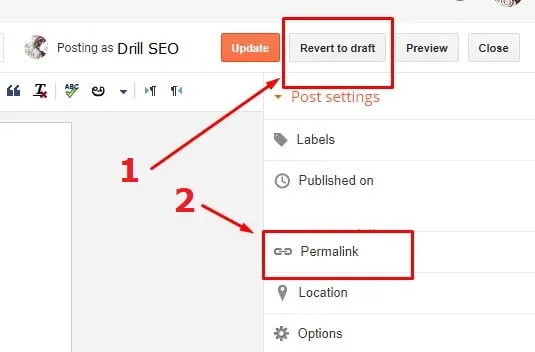
- In the right-hand Post settings sidebar, click the Permalink tab.
- Select Custom Permalink (instead of "Automatic Permalink").
- Type your optimized, hyphen-separated keyword slug (e.g.,
speed-up-wordpress-website). Do not include the.htmlextension — Blogger appends it automatically. - Click Publish. Your post will be permanently published with your custom slug.
Blogger Permalink Formatting Rules
- Cannot Change After Publishing: Once published, Blogger locks the permalink. To change it, you must revert the post to draft, update the custom slug, and re-publish.
- Year/Month Preservation: Blogger's URL structure always includes
/YYYY/MM/preceding your slug. This cannot be removed on standard Blogger infrastructure.
Setting Custom 301 Redirects in Blogger
If you change a permalink on an already-indexed post, you must configure a 301 redirect to avoid broken 404 links:
- Go to Blogger Settings > Errors and redirects > Custom redirects.
- Click Add.
- In From, enter the old path (e.g.,
/2026/01/old-slug.html). - In To, enter the new path (e.g.,
/2026/01/new-slug.html). - Check Permanent and click OK > Save.